
Setup → Materials
Purpose · Steps · Inputs and units · Limitations · Related topics
Purpose
Assign a material to each simulation domain and review its flow and thermal properties. For fluid domains, choose the viscosity model in Domain properties.
Steps
- In the Setup tab, click a domain or its material under Domains to open Domain properties.
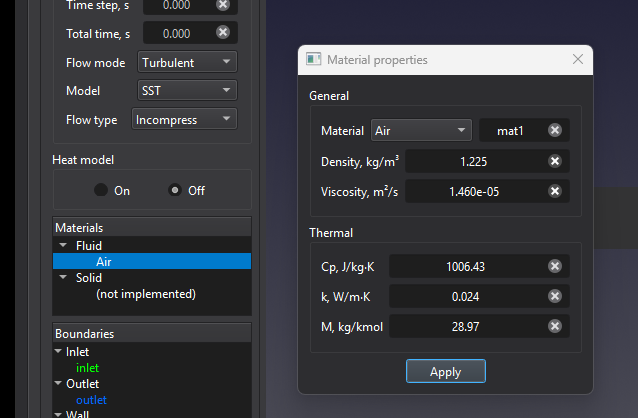
- Use Domain to select the domain to edit. Check its Fluid or Solid role as appropriate to the simulation.
- Choose a library material in Material. To create a custom material, choose New →, enter a name in the adjacent field, and fill in the required properties.
- For a fluid, choose Viscosity model. Newtonian uses a constant kinematic viscosity. Power law uses a viscosity that varies with shear rate and requires the minimum and maximum dynamic viscosity, consistency index m, and flow index n.
- Review the enabled Flow and Thermal fields in the displayed units, then click Apply. Repeat for other domains as needed.
The image shows Air in a fluid domain with Turbulent flow, incompressible Flow type, and Heat model Off. Newtonian is selected; Power law is disabled because the flow is turbulent. Density and Viscosity are active, while Cp, k, and M are inactive for this configuration.
Inputs and units
| Input or value | Meaning | Units |
|---|---|---|
| Domain / Fluid / Solid | Selects the domain and identifies its role in the simulation. | No physical units |
| Material | Library material, or New → for a named custom material. | No physical units |
| Viscosity model | Newtonian for constant viscosity, or Power law for shear-dependent viscosity. | No physical units |
| Density | Material reference density. | kg/m³; lb/ft³ |
| Viscosity (Newtonian) | Constant kinematic viscosity for fluids. | m²/s; ft²/s |
| Minimum / Maximum viscosity (Power law) | Lower and upper bounds on the apparent dynamic viscosity. | Pa·s; psi·s |
| Consistency index m (Power law) | Coefficient in apparent viscosity = m × shear raten − 1, bounded by the minimum and maximum viscosity. | Pa·sⁿ; psi·sⁿ |
| Flow index n (Power law) | Below 1: shear thinning; 1: constant viscosity; above 1: shear thickening. | Dimensionless |
| Cp | Specific heat capacity; enabled for heat transfer or compressible fluid flow. | J/(kg·K); BTU/(lb·°F) |
| k | Thermal conductivity; enabled for heat transfer or compressible fluid flow. | W/(m·K); BTU/(h·ft·°F) |
| M | Molecular weight where required for a compressible gas. | kg/kmol; lbm/lbmol |
| Volumetric heat source | Signed source term available for a solid domain with heat transfer enabled. | W/m³, as labelled in the dialog |
Limitations
- Power law requires Pro and supports single-fluid, incompressible, isothermal, laminar flow, steady or transient. Select Laminar in Flow mode to make Power law available with Pro. Compressible, mixture, thermal/CHT, and turbulent calculations are not supported with this model.
- Power-law material presets are disabled while Newtonian is selected. Choose a compatible material and viscosity model before applying.
- Required properties must be finite and positive. For Power law, the minimum viscosity must not exceed the maximum. Compressible-gas properties must also satisfy the material validation checks; constant properties may not represent a large temperature range.
- Solid domains are supported in CHT, which requires Pro. The volumetric heat source is shown only for a solid domain with heat transfer enabled and may be positive, negative, or zero.