
Setup → Heat
Purpose · Steps · Inputs and units · Limitations · Related topics
Purpose
Include thermal transport and, where applicable, buoyancy, conjugate heat transfer, or radiation.
Steps
- Enable Heat in Setup and configure the thermal material properties and boundary conditions.

- For natural convection, open Settings → Operating Conditions and enable Buoyancy.

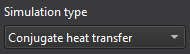
- For fluid–solid heat transfer, choose conjugate heat transfer in Simulation type and assign the domain materials and interface settings.
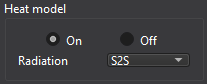
- If needed, enable the surface-to-surface model in the Radiation controls.
Inputs and units
| Input or value | Meaning | Units |
|---|---|---|
| Temperature | Thermal boundary and material reference values as labelled. | K (SI); °F (Imperial) |
| Heat flux | Positive wall flux heats the domain; negative flux cools it. | W/m²; BTU/(h·ft²) |
| Conductivity / specific heat | Thermal material properties. | See Materials |