
Mesh → Surface refinement
Purpose · Steps · Inputs and units · Limitations · Related topics
Purpose
Set local cell size and boundary layers for selected surfaces, or mark an internal surface as a thin wall or porous baffle.
Steps
- Open Surface mesh settings and choose the required entry under Surface name.
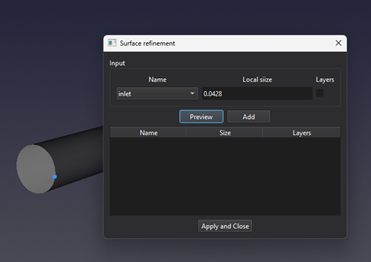
- Under Type, enable the options you need. Select Refinement to enter a Local size. Select Boundary layers to add prism layers; refinement and layers can be used together where allowed.
- For boundary layers, enter Number of layers, First-layer thickness, and Growth ratio. The Total thickness value updates automatically as these inputs change.
- For an internal surface, choose Thin wall for a wall baffle or Porous for a porous baffle when required. These options are disabled for external boundary surfaces, such as the inlet shown in the image.
- With Refinement enabled, click Preview to inspect the local cell size. Click Add to place the current surface settings in the table, or update the existing row for that surface. Repeat for other surfaces.
- To edit a saved row, double-click it, change the settings above, and click Add again. To remove a row, right-click it and choose Delete surface. Finally, click Apply and Close to apply the rows in the table.
Inputs and units
| Input or value | Meaning | Units |
|---|---|---|
| Surface name | Named external boundary or internal surface to configure. | Text selection |
| Refinement / Boundary layers | Enable local size and layer controls respectively. Both can be selected where supported. | On / off |
| Thin wall / Porous | Alternative baffle types for internal surfaces; only one can be selected. | On / off |
| Local size | Positive target spacing near the selected surface; use a value smaller than the global cell size. | m (SI); ft (Imperial) |
| Number of layers | Number of prism layers, from 1 to 100. | Integer count |
| First-layer thickness | Positive thickness of the layer adjacent to the surface. | m (SI); ft (Imperial) |
| Growth ratio | Thickness of each layer divided by the preceding layer thickness; allowed range 1 to 10. A value of 1 gives equal thicknesses. | Dimensionless |
| Total thickness | Calculated sum of all layer thicknesses, using the layer count, first-layer thickness, and growth ratio. | m (SI); ft (Imperial) |
| Settings table | Name identifies the surface; Refinement, Thin wall, Porous, and Layers show Yes or No. Size shows the local size, or a dash when no local size is stored. Layers indicates whether layers are enabled, not their count. | Flags and length in the Size column |
Limitations
- Thin wall and Porous are available only for internal surfaces and are mutually exclusive. On an internal surface, boundary layers require Thin wall; Porous disables boundary layers.
- A local size equal to or larger than the global cell size is not treated as local refinement. With no local refinement size, the global mesh size is used.
- Preview shows local refinement size; it does not generate the mesh or verify that the requested layers will form. Total thickness is a calculated target.
- Click Add after changing the controls. Apply and Close applies the table rows; it does not automatically add unlisted changes. Delete surface removes the settings row, not the underlying geometry.
- Thin gaps, sharp corners, or aggressive layer growth can prevent the requested layers from forming. Inspect the generated mesh rather than assuming every requested layer exists.