Setup → Flow type

Purpose · Steps · Inputs and units · Limitations · Related topics

Purpose

Choose the compressibility treatment appropriate to the flow speed and physics.

Steps

  1. Estimate the expected flow speed relative to the speed of sound.
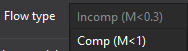
    Flow type controls

  2. Choose the incompressible, subsonic compressible, or high-speed compressible option in Flow type as appropriate.
  3. Review material, pressure, temperature, boundary, and time settings after changing the flow type.

Inputs and units

Input or valueMeaningUnits
Mach number MVelocity divided by local speed of sound; low-speed flow below about 0.3 is commonly treated as incompressible.Dimensionless
Flow typeThe selected compressibility / solver family.No physical units

Limitations

All help topics