Steps
- Select the Plane tool.

- Define the plane position and axis orientation in Input, then create it.
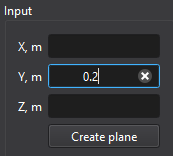
- Click the plane in Post entities to choose a result variable and plot type. Select the required saved result time before reading reports.
Purpose · Steps · Inputs and units · Limitations · Related topics
Create a cutting plane for contours, vectors, and supported surface heat-transfer reports.
| Input or value | Meaning | Units |
|---|---|---|
| Coordinates / lengths | Use the unit displayed beside the field. | m (SI); ft (Imperial) |
| Orientation | Global axis direction defining the plane normal. | X, Y, or Z |
| Average heat flux | Conductive and turbulent-diffusion flux for a solved temperature field. | W/m²; BTU/(h·ft²) |
| Total heat-transfer rate | Integral of the reported heat flux over the surface or plane. | W; BTU/h |
| Heat-transfer sign | Positive flux enters the domain on a boundary; on a plane it follows the normal. Reversing the plane normal reverses the sign. | Signed flux or rate |