Steps
- Choose the Point, Line, or Plane tool.
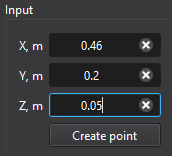
- Enter the coordinates and any orientation requested by the active tool, then create the entity.
- Select the new entity in Post entities to configure its result variable.
Purpose · Steps · Inputs and units · Limitations · Related topics
Enter locations and geometric parameters for post-processing points, lines, and planes.
| Input or value | Meaning | Units |
|---|---|---|
| Coordinates / lengths | Use the unit displayed beside the field. | m (SI); ft (Imperial) |
| Position / endpoints | Global coordinates of the point, line endpoints, or plane location. | m (SI); ft (Imperial) |
| Plane orientation | Axis selection when using the Plane tool. | X, Y, or Z |