Steps
- Open Settings in the top menu.
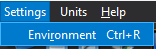
- Choose Settings → Operating Conditions, or press Ctrl+R, to edit reference pressure and, when heat transfer is enabled, buoyancy settings. Click Apply in that dialog.
- Open Settings → Appearance and choose Classic or Modern to change the interface appearance. A dot marks the active choice. CFxD remembers your choice between sessions; Modern is used when no preference has been saved.