
Setup → Iterations
Purpose · Steps · Inputs and units · Limitations · Related topics
Purpose
Set the stopping limit and, for transient simulations, the physical time controls.
Steps
- Select Steady or Transient first.
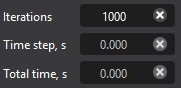
- For Steady, enter the total iteration limit.
- For Transient, enter total time, time step, and iterations per time step. Review the enabled controls after changing physical models.
Inputs and units
| Input or value | Meaning | Units |
|---|---|---|
| Iterations | Steady iteration limit or iterations per transient time step, according to mode. | Integer count |
| Total time | Requested transient simulation duration. | s |
| Time step | Requested time increment for transient integration. | s |