
Setup → Operating conditions
Purpose · Steps · Inputs and units · Limitations · Related topics
Purpose
Set reference pressure and, for thermal cases, the buoyancy reference temperature and gravity vector.
Steps
- Open Settings → Operating Conditions.
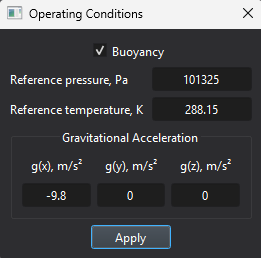
- Enter the reference pressure. With heat transfer enabled, select Buoyancy if required.
- For buoyancy, enter the reference temperature and gravity components, then click Apply.
Inputs and units
| Input or value | Meaning | Units |
|---|---|---|
| Reference pressure | Absolute reference pressure. | Pa |
| Reference temperature | Reference value for buoyancy. | K |
| g(x), g(y), g(z) | Signed gravity components along the global axes. | m/s² |