
Setup → Boundaries
Purpose · Steps · Inputs and units · Limitations · Related topics
Purpose
Assign flow and thermal conditions to the boundary patches of the mesh.
Steps
- Open Boundaries and select a category or listed patch to display its settings.
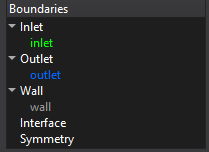
- Select the required patch and boundary type, then enter the flow values and any enabled turbulence or thermal values.
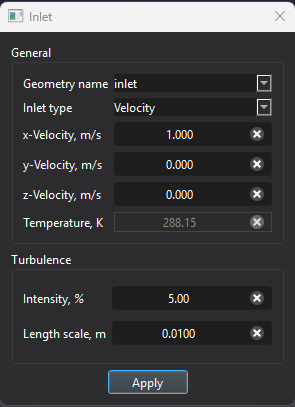
- For prescribed wall heating, select Heat flux in the thermal settings and enter the signed flux. Apply the changes.
- For a CHT interface, review the paired interface and select the required thermal contact condition. Check patch assignments in the Setup view.
Inputs and units
| Input or value | Meaning | Units |
|---|---|---|
| Velocity / mass flow | Values required by the selected inlet condition. | m/s and kg/s; ft/s and lb/s |
| Pressure / temperature | Use the pressure convention and values indicated in the boundary dialog. | Pa and K; psi and °F |
| Heat flux | Positive values heat the domain; negative values cool it. | W/m²; BTU/(h·ft²) |
| Thermal contact | Perfect contact or resistance for supported interfaces. | Use the interface field label |