
Mesh → Volume refinement
Purpose · Steps · Inputs and units · Limitations · Related topics
Purpose
Apply local refinement within a box or cylinder, or define a volume zone for supported models.
Steps
- Open Volume refinement | Zones and choose the required type and Box or Cylinder shape.
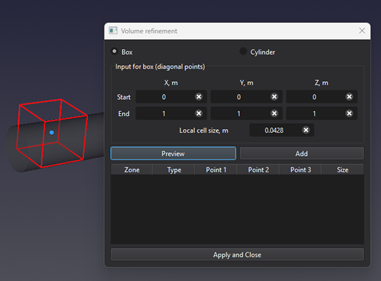
- For a box, enter two diagonal corner points. For a cylinder, enter the center, radius point, and height point.
- For refinement, set the local cell size. Use Preview, Add to List, then Apply and Close. Right-click a listed entry to remove it.
Inputs and units
| Input or value | Meaning | Units |
|---|---|---|
| Coordinates / lengths | Use the unit displayed beside the field. | m (SI); ft (Imperial) |
| Local cell size | Target spacing inside the refinement volume. | m (SI); ft (Imperial) |
| Zone type | Refinement, Porous, or Rotating, as available. | No physical units |