
Mesh → Quality graphs
Purpose · Steps · Inputs and units · Limitations · Related topics
Purpose
Review the quality distribution of the generated mesh and locate cells within a selected orthogonality or skewness quality range.
Steps
- Generate or load the mesh, then use the Mesh quality panel. Select Ortho for orthogonality quality or Skew for skewness quality.
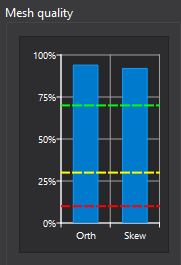
- Read the quality bands on the vertical axis and the number of Cells on the horizontal axis. A longer bar means more cells in that quality band. For both metrics, values closer to 1 are better.
- Hover anywhere across an occupied quality row to see its score range, cell count, and percentage of the total cell count. Hover over the chart title for an explanation of the metric and displayed range.
- Click anywhere across an occupied row, not only on the bar, to isolate its cells in the mesh view. The selected bar and matching cells turn orange; the other mesh cells are temporarily hidden. The image shows this selection in use.
- Click the same row again to restore the normal mesh display. Selecting a different row shows that row's cells; switching between Ortho and Skew clears the selection.
- Inspect low-quality cell locations, adjust global size, local refinement, or layer settings as needed, and regenerate the mesh before checking the distribution again.
Inputs and units
| Input or value | Meaning | Units |
|---|---|---|
| Ortho | Orthogonality quality based on each cell's worst internal-face non-orthogonality. A score of 1 is orthogonal; 0 corresponds to an angle of 65° or higher. | Dimensionless score, 0–1 |
| Skew | Skewness quality based on each cell's worst face. The displayed score is normalized so that 1 is ideal and 0 is worst. | Dimensionless score, 0–1 |
| Quality bands | Score intervals of width 0.1, such as 0.7–0.8. The vertical axis spans the lower edge of the lowest occupied band to the upper edge of the highest occupied band. | Dimensionless score |
| Cells | Number of volume cells in each quality band, shown by horizontal bar length. Each cell is counted once for the selected metric. | Integer count |
| Hover details | Quality range, number of cells in that range, and their share of the total mesh cell count. | Score, count, and percent (%) |
| Orange selection | The currently selected quality band and the corresponding isolated cells in the mesh view. | Display selection; no physical units |
Limitations
- These charts display quality scores, not raw non-orthogonality angles or raw skewness values. Higher displayed scores are better for both Ortho and Skew. The percentage in a hover tooltip describes the share of cells, not their quality score.
- Blue bars show cell counts; orange marks the selected band. These colors are not acceptance thresholds. The displayed vertical range adjusts to the occupied bands and may not show the full 0–1 range.
- Only occupied rows can be selected. Isolating cells changes their display, not the mesh itself. Regenerating or loading a mesh resets the selection and distribution.
- Cells with invalid geometry are included in the lowest quality band. A histogram alone does not identify every mesh defect; review mesh-generation and validation messages as well.
- Low-quality cells can affect solver stability and accuracy, but no single quality score guarantees a usable mesh. Check the solution behavior and sensitivity to mesh changes.