
Geometry → Create point
Purpose · Steps · Inputs and units · Limitations · Related topics
Purpose
Create a point at specified global coordinates for use by other geometry tools.
Steps
- Select the Point tool.

- Enter X, Y, and Z in the Input panel, check the length unit, and click Create point.
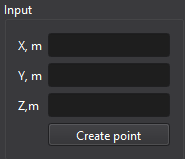
Inputs and units
| Input or value | Meaning | Units |
|---|---|---|
| Coordinates / distances | Use the unit shown beside the Geometry input fields; the small-unit button switches m to mm, or ft to in. | m or mm (SI); ft or in (Imperial) |
| X, Y, Z | Position relative to the global origin. | Selected Geometry length unit |