
General → Units
Purpose · Steps · Inputs and units · Limitations · Related topics
Purpose
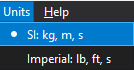
Choose the unit system used to enter and display physical values.
Steps
- Open Units and choose SI: kg, m, s or Imperial: lb, ft, s.
- Before entering a value, check the unit beside its field.
- In the Geometry Input panel, use the length-unit button for m/mm or ft/in when working on small features.
Inputs and units
| Input or value | Meaning | Units |
|---|---|---|
| Length | General length fields; Geometry also offers mm or in. | m (SI); ft (Imperial) |
| Velocity / pressure | Velocity and pressure field labels. | m/s and Pa; ft/s and psi |
| Temperature | Absolute temperature in SI; Fahrenheit in Imperial. | K; °F |
| Time / angles | Simulation time and Geometry rotation. | s; degrees |
Limitations
- The Geometry small-unit button applies to Geometry input. Check other dialogs separately; Operating Conditions currently labels its values in Pa, K, and m/s².