Skip to content
General → User interface
User interface
- The CFxD interface is designed to simplify the workflow.
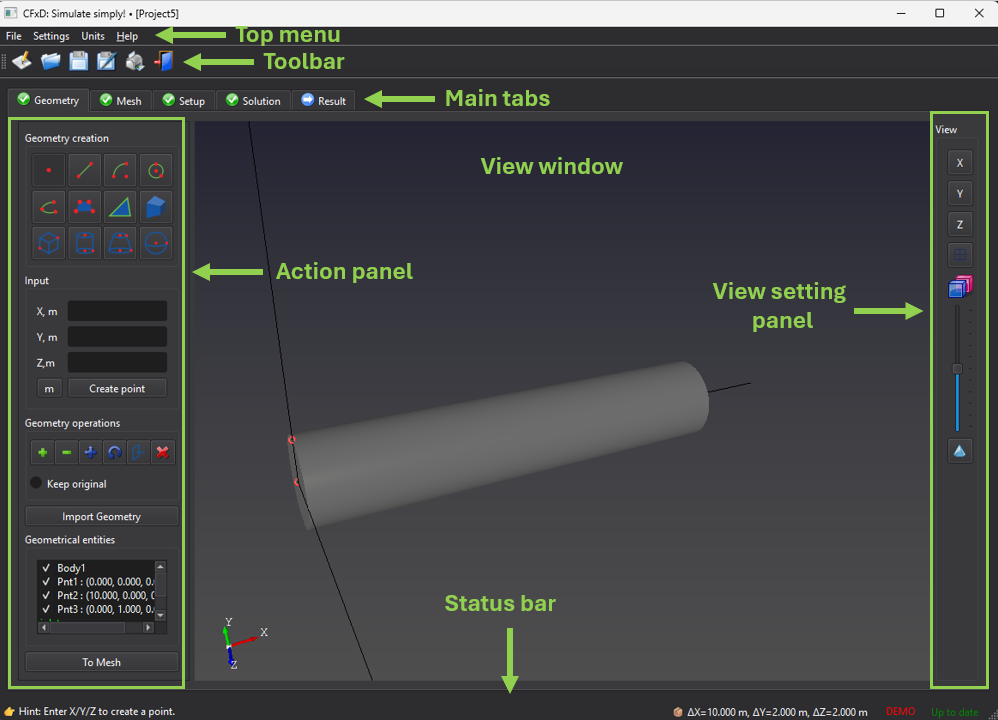
- The top menu provides access to common operations, including file management, unit switching, report generation, help, and program information.
- The toolbar contains icons that replicate most operations available in the top menu.
- The main tabs cover all steps required for a CFD simulation: Geometry, Mesh, Setup, Solution, and Result.
- Each tab is divided into two main sections: the Action menu on the left and the View window on the right.
- Tabs that include a View window also provide a View Settings panel on the right.
- The status bar is located at the bottom of the window and displays hints, overall geometry dimensions, license type, and update status.
Tips
- Press [F1] to open interactive help for the currently focused UI element.
Back to main menu
