
General → Basic operations
Purpose · Steps · Inputs and units · Limitations · Related topics
Purpose
Create, open, save, and close simulation projects from the File menu or toolbar.
Steps
- Choose New to create a project, or Open to load an existing project.
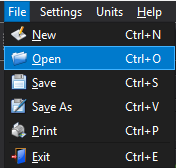
- Choose Save while working. Use Save As to save the project under another name.

- Use Print for the available report or log output, and Exit to close CFxD.
Inputs and units
| Input or value | Meaning | Units |
|---|---|---|
| Project | Select a project location and name in the file dialog. | File or folder path |
Limitations
- Save your project before closing or changing projects. A saved project and a generated PDF report serve different purposes; use Report for the simulation summary.